
AnkorPay Release Notes
AnkorPay 8.3.0: QuickBooks integration, payout details, and clearer payment status
October 15, 2026
✨ New
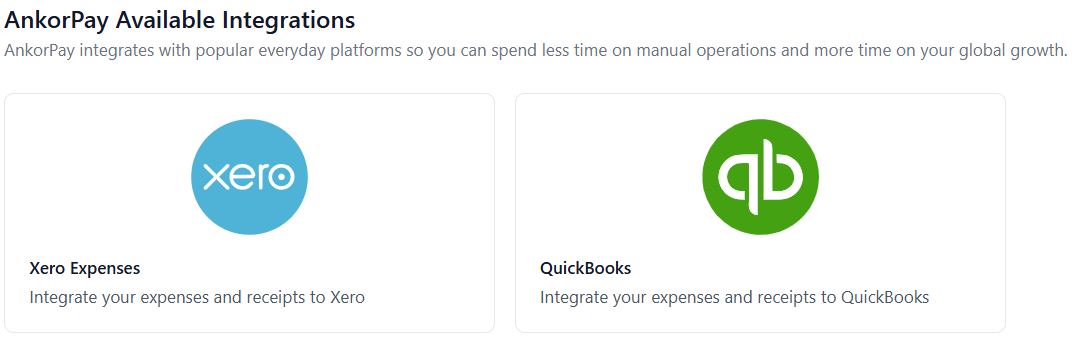
QuickBooks Online integration (Accounting)
Organisations can now connect AnkorPay also to QuickBooks Online from Settings > Integrations. Each vessel account connects to its own QuickBooks company. You can map currencies to QuickBooks bank accounts and AnkorPay VAT codes to QuickBooks tax codes, and choose which QuickBooks accounts are available as AnkorPay categories. Operations expenses can then be synced to QuickBooks.
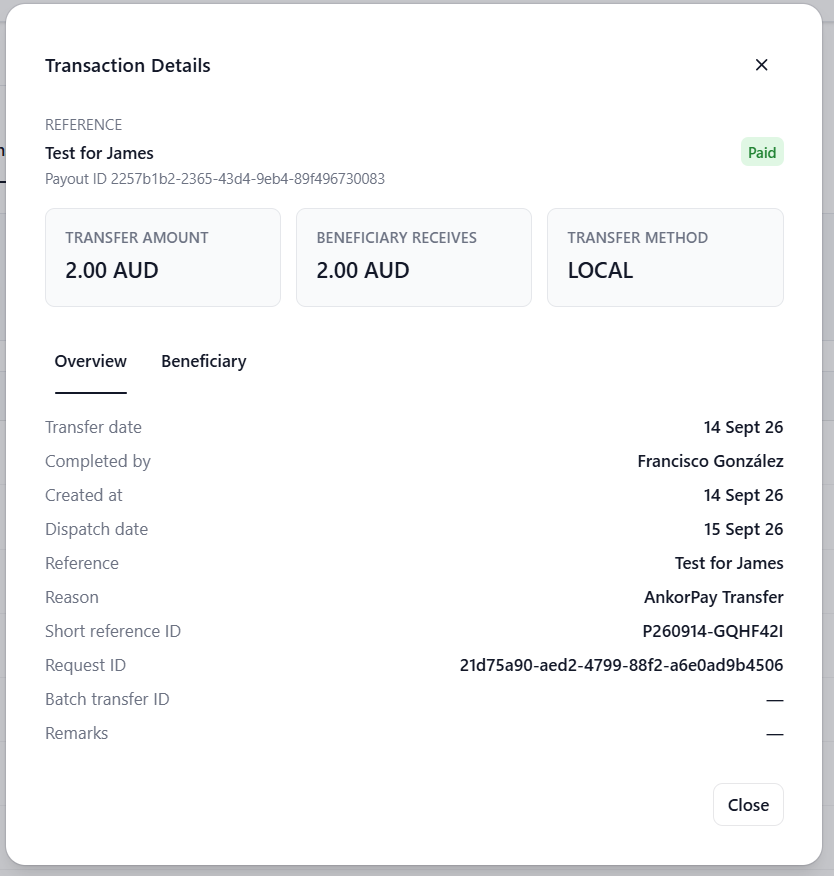
Payout and beneficiary details in the Wallet
Selecting a Payout in the Wallet now opens a details window. It shows the transfer and the beneficiary it was sent to, so you no longer need to look them up separately.
Charter Sign-Off attachments are saved as you go
A signed PDF uploaded during Charter Sign-Off is now saved straight away as a draft. It stays attached if you refresh, leave the page or come back later, rather than only being saved when sign-off is completed.
🔧 User Experience improvements
- Payment Status now sits directly to the right of Payment Method on the APA, Operations and Charter expense tables
- Approved AnkorPay bank transfers that are still waiting to be paid now show Unpaid in Payment Status instead of a dash
- AnkorPay expenses paid by an internal transfer now show their payment status (for example Settled) in expense tables, matching the expense details page
- The first Xero sync now brings in the last 89 days of transactions instead of 30
- The charter dropdown on new and edited transactions loads faster
- The browser tab and home screen icon now use the AnkorPay app icon
AnkorPay App 1.14.0
October 7, 202
✨ New
Add receipts to approved expenses
Spenders can now attach receipts to an expense after it has been approved, even when the expense's other details can no longer be edited. Saving uploads only the new receipts and leaves the approved details unchanged.
Charter currency amounts in the expense list
The expense list now shows each expense in the currency it was paid in. If the expense is assigned to a charter that uses a different currency, the charter currency amount appears underneath.
AnkorPay 8.0.0: Approval workflows, payment status, and clearer expense totals
October 6, 2026
✨ New
Approval Workflows
Admins can configure multi-level approval workflows for Operations and APA, including rules and stages, and can enable or disable workflows. Workflow edits are blocked or warned when expenses are already in flight, and save only enables when there are changes.
Expense activity log
Users can view an activity timeline on expense details showing what happened on an expense and who performed each action.
Payment Status on expense tables
APA Expenses, Operations Expenses, and Charter Expenses tables show a Payment Status column so users can see payment status (for example Pending, Success, Sent, or Paid) without opening each expense.
Original & converted currency amounts display on expenses table
When an expense has been converted, expense lists show the original amount and currency underneath the converted Total.
🔧 Small improvements
- Users can sort every data column on the charter sign-off Transaction History ledger
- Users see an updated deposit window when adding a deposit
- Collapsed left-nav accordion state persists across sessions
- Edit transaction uses the same Actions dropdown as other expense views
- Messages shown when an approver can't approve an expense now explain why more plainly, for example when they aren't an approver on the current stage or have already approved an earlier stage
- Vessel Admin and lower roles no longer see signed-off charters when selecting a charter for a manual expense
AnkorPay App 1.13.0 Expense activity and rejection reasons
September 29, 2026
✨ New
Expense activity log
Users can view an activity timeline on expense details in the AnkorPay app, showing what happened on an expense and who performed each action.
Reject with a reason
When their role allows, users rejecting an expense can include a reason. Rejected expenses show that reason on the expense details screen.
🔧 Small improvements
- Approvers see clearer guidance when an approval action cannot proceed, including why the action is unavailable, instead of action buttons disappearing without explanation
AnkorPay 7.6.3: Cache improvements and bug fixes
September 16, 2026
🔧 Small improvements
- Improvements to caching layer for better web performance
🐞 Bug fixes
- Fixed an issue where SCA hangs during add beneficiary flow
- Fixed incorrect VAT labels for expense create and edit
AnkorPay 4.5.0: May 20, 2026
Cash Float, Xero tax rates, and expense improvements
This release introduces Cash Float for the Ops module, giving vessel teams a structured way to manage physical cash alongside digital spend. It also brings Xero tax rate labels, several improvements to expenses and deposits, and a handful of bug fixes.
Cash Float for Ops
You can now manage a vessel-level cash float directly within the Ops module. Track available cash, log top-ups and transfers between charters, and see cash activity reflected in your transaction table and expense forms in real time.
Xero tax rate labels
Tax rates synced with Xero now display labels in the integration, making it easier to match expenses to the correct tax treatment in your accounting system.
Charter filter in Deposits
The Deposits list in the APA Wallet now includes a charter filter, making it faster to find and attribute incoming funds to the right charter.
View receipts from Signed Off and Signing Off charters
Receipts attached to expenses are now viewable directly from the charter expenses list on Signed Off and Signing Off charters, without needing to open each expense individually.
Cardholders can activate their own cards
Cardholders can now activate their own physical card from the AnkorPay App.
AnkorPay 4.4.0: May 11, 2026
Expense Reports with Receipts
Download expense reports
You can now generate and download expense reports in CSV format, with all associated receipts bundled in a ZIP file. This makes it easier to pull the data you need for reconciliation or record-keeping.
Activate physical cards
You can now activate a physical AnkorPay card on the platform before it arrives.
Mandatory charter on APA manual expenses
When logging a Manual Expense from the APA expenses list, the charter field is now mandatory, ensuring every APA expense is attributed to a charter.
AnkorPay 4.3.0: April 30, 2026
New and improved transfer flow
Improved transfer flow
The wallet transfer experience has been redesigned with a clearer step-by-step flow, including a fee preview before you confirm, so you can see any applicable charges upfront.
Better transfer descriptions
Internal transfers (APA owes Ops) and external transfers (Payouts) now have much clearer descriptions, making it easier for users to understand and track their transactions.
Payment details for expenses
Expenses now include a dedicated payment section that shows how each expense was paid, making it easier to review and reconcile spending.
🔧 Small improvements
- Wallet transaction descriptions now show the payout reference instead of internal identifiers, making it easier to match transactions with external records.
- Vendor name on expenses no longer defaults to "Unknown" when no vendor is provided.
🐞 Bug fixes
- Fixed a navigation issue when using the back button in certain views.
AnkorPay 4.2.0: April 14, 2026
AI-powered receipt scanning and Xero tracking categories
AI-powered receipt scanning
When uploading a receipt on a new expense, AnkorPay now uses AI to automatically extract details such as vendor name, amount, currency, and date. This works across both the APA and Operations modules, reducing manual data entry and helping crew log expenses more quickly.
Xero tracking categories
You can now assign up to two Xero tracking category fields directly on expenses in AnkorPay. If your Xero account uses tracking categories, these values carry through when you sync expenses, keeping your Xero reporting consistent without manual re-entry.
Category selection on payouts
You can now assign an expense category when creating a payout from the wallet, keeping your records consistent with card and manual expenses.
🔧 Small improvements
- Date columns in APA Owes Operations now display dates only, without timestamps, for a cleaner layout.
🐞 Bug fixes
- Fixed an issue where users with the Viewer role appeared in the available cardholders list when issuing a card.
📱 AnkorPay App 1.5.1
Auto-populate expense details using AI
When you upload a receipt, AnkorPay now uses AI to automatically extract key details such as vendor name, amount, currency, date and comments. This reduces manual data entry and helps you log expenses faster while on charter.
AnkorPay 4.1.0: March 25, 2026
Transfers between Operations and APA, updated roles, and Sign-Off improvements
This release introduces transfers between the Operations and APA modules, along with improvements to role management, Charter Sign-Off, and card settings.
Transfer funds between Operations and APA
You can now move funds between your Operations and APA wallets directly from AnkorPay. This makes it easier to manage balances across both modules without needing external transfers.
Vessel Admin role and updated role names
Organisation-level admin and owner roles have been renamed for clarity. You can now invite users directly as a Vessel Admin, giving them full access to a specific vessel without organisation-wide permissions.
Category percentage breakdown on Charter Sign-Off
The Charter Sign-Off now includes a percentage breakdown by expense category, giving charterers and admins a clearer picture of how APA funds were allocated across the charter.
🔧 Small improvements
- You can now copy Global Account details (account number, IBAN, routing info) directly to your clipboard for easy sharing.
- Card limit reset times are now visible, so cardholders and admins can see when spending limits refresh.
- Per-transaction limit is now mandatory when issuing or editing a card, ensuring every card has a spend cap in place.
- Expenses incorrectly marked as settled can now be marked as unpaid so they are included in the correct settlement.
- Organisation and vessel user lists now support pagination for easier navigation on larger teams.
- Wallet balance is now validated before processing a payment, preventing payouts that exceed available funds.
- Vessel users’ sidebar access is now restricted to Vessel Admin and above.
- Improved side navigation active states in dark mode for better visibility.
🐞 Bug fixes
- Fixed an issue where the charter expenses list appeared empty after returning from an expense detail view.
- Fixed an issue where signed-off charters could still be edited.
- Fixed an issue where attachments were removed after clicking "clear all" on an expense form.
- Fixed a routing issue on the APA dashboard.
- Fixed an issue where "skip for now" in the onboarding flow did not work as expected.
📱 AnkorPay App 1.5.0
🚀 Card limits and expense approvals
This update gives users better visibility into their cards and streamlines the expense review process for Approvers, Admins, and Owners.
- View card limits directly in the app
- Approve or reject expenses with the appropriate permissions
- UX improvements for a smoother experience
- Includes bug fixes and performance enhancements
AnkorPay 4.0.0: February 23, 2026
Introducing Operations – Full vessel spend management
We’re excited to launch Operations, Ankor’s new module designed to manage vessel operational spend alongside APA.
Operations provides charter operators and vessel teams with complete visibility and control over day-to-day boat expenses, approvals, budgets, and settlement workflows — all structured within the Ankor account hierarchy.
This release builds on the APA foundation and introduces full operational wallet management across Entities, Vessel Accounts and Charter Accounts.
Vessel wallets & multi-currency control
Manage balances at the vessel level, allocate funds to charters, process transfers and handle FX seamlessly.
Smart expense tracking
Card, cash and manual expenses in one workflow.
Receipts, VAT handling, categories and real-time status tracking built in.
Virtual card management
Create cards, set limits, freeze instantly and track usage in real time.
Compatible with Apple Wallet and Google Wallet.
📱 AnkorPay App 1.4.0
APA and Operations modules
You can now manage cards and expenses separately across APA and Operations modules, giving you clearer visibility and control over different types of spend.
- Switch between APA and Operations directly from the app header or user settings
- Experience distinct layouts and themes for each module to make context switching easier
🛠 Improvements
- General bug fixes
- Performance enhancements across the app
AnkorPay 3.0.2: February 10, 2026
Charter mandatory fields
🔧 Small improvements
- Simplified charter creation by reducing and adjusting mandatory fields.
- Improved wallet transaction display to ensure each transaction appears only once, removing duplicate line items.
🐞 Bug fixes
- Fixed an issue where Strong Customer Authentication wasn’t working in some conditions.
AnkorPay 3.0.1: February 3, 2026
Edit cardholders
🔧 Small improvements
- Admins can now edit cardholder details.
AnkorPay 2.0.0: January 22, 2026
Small Fixes
🔧 Small improvements
- Improved receipt and attachment previews so files are easier to view and review.
- Updated currency selection when setting card limits to show an accurate list.
- Removed default currency selections during currency conversion to reduce errors.
AnkorPay 1.3.1: January 7, 2026
Small Fixes
🐞 Bug fixes
- Fixed an issue where, in some cases, users were redirected to a page that didn’t exist.
- Fixed an issue that prevented users from updating an expense in specific scenarios.
AnkorPay 1.3.0: January 5, 2026
This release focuses on improving the charter sign-off experience, tightening up expense workflows, and fixing a few frustrating edge cases
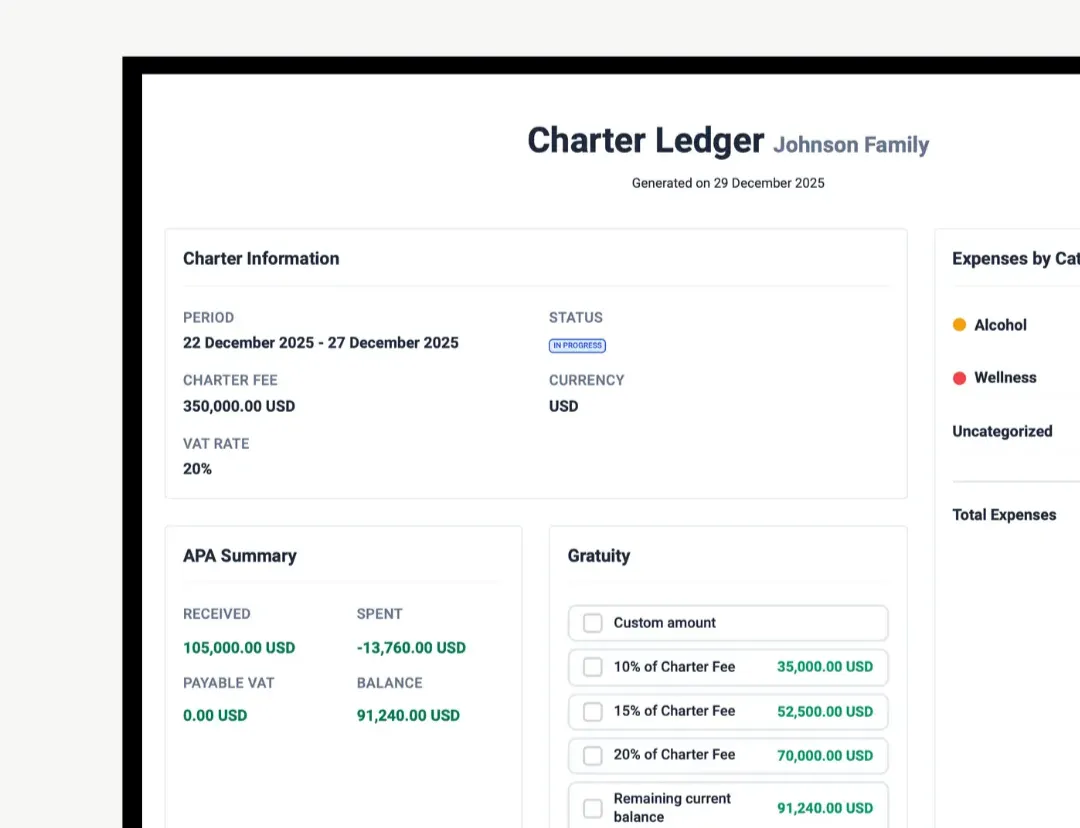
A clearer, more readable Sign-Off ledger
We’ve refreshed the Sign-Off PDF so key charter and APA information is easier to scan and understand at a glance. The layout is more structured, highlights the most relevant totals up front, and keeps detailed information neatly organised.
Receipts built directly into expenses
Uploading and reviewing receipts is now part of the main expense flow. You can add receipts while creating or editing an expense, and view everything in one place without switching tabs.
🔧 Small improvements
- You can now download the Sign-Off ledger directly from the charter sign-off view for easy sharing and record keeping.
- Expense information is clearer and more consistent across views
- Charter lists are now ordered by the most recent start date
- Zero-value gratuities are now supported
- Unsettled deposits can no longer be assigned to a charter
🐞 Bug fixes
- Fixed an issue where using the back button after signing off on a charter could cause a navigation loop
- Resolved cases where incorrect attachments appeared in transaction views
📱 App updates and fixes
- Fixed an issue where the charter field could appear empty when viewing or editing expenses on signed-off or completed charters
- Added support for uploading and viewing PDF receipts on expenses
- Introduced pull-to-refresh on the “no cards” screen
AnkorPay 1.2.0: December 16, 2025
We’ve made it simpler to sign off on charters and easier for admins to understand who’s spending what
Sign with your finger during the charter sign-off
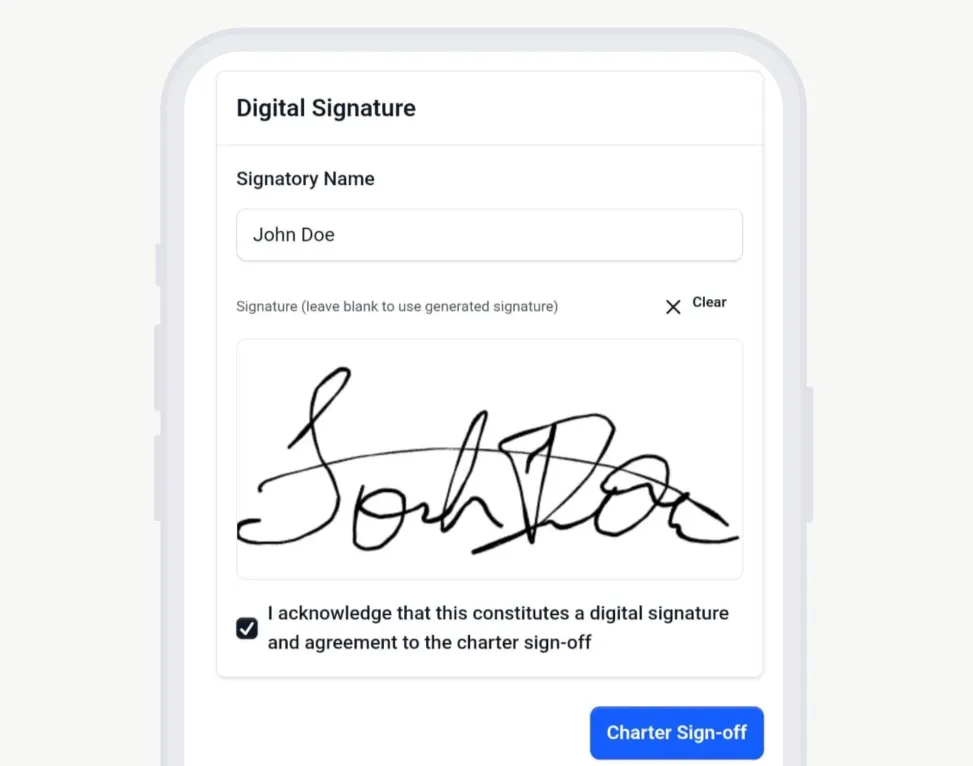
You can now add a digital signature using your finger directly in the Charter Sign-Off flow. This makes the process faster and more intuitive for captains and clients, while improving the reliability and trustworthiness of signatures.
See who spent what
Transaction views now include spender information, helping admins stay on top of team spend and review activity with more confidence.
🔧 Small improvements
- Updated the Help Centre links to make support content easier to access.
- Renamed Log Expense to Log Manual Expense for clarity.
- Moved the Gratuity section on Charter Sign-Off below the transaction history table for a more precise flow.
- Updated mandatory expense labels to reflect customer expectations.
- Removed the “No gratuity” option from the charter sign-off.
🐞 Bug fixes
- Fixed an issue where a charter with a negative balance could incorrectly suggest a negative gratuity during sign-off.