
Creating a Global Account
What is a Global Account in AnkorPay
Is a virtual bank account that could be located in different countries/currencies and allow direct deposits into the vessel's wallet.
Once you pass your KYC and get the Entity verified, you will have a base Bank Account. However, you will be able to create as many Global Accounts, depending on your currency needs.
Important: Your Entity has to be already validated in order to Open a Bank Account. Go to 'Dashboard' and confirm wheter your vessel has been verified or not. To know more see this article.
Capabilities of a Global Account:
- → Has currency-specific details (IBAN, routing numbers, etc.) that can be copied
- → Account information and addresses
- → Transaction history of inbound payments
- → Capability of receiving funds and able to process Payouts
How to create a Global Account in seconds
IMPORTANT NOTE: If you're creating an account in EUR, please check this article beforehand to decide which account (Netherlands or Denmark) is more convenient for you.
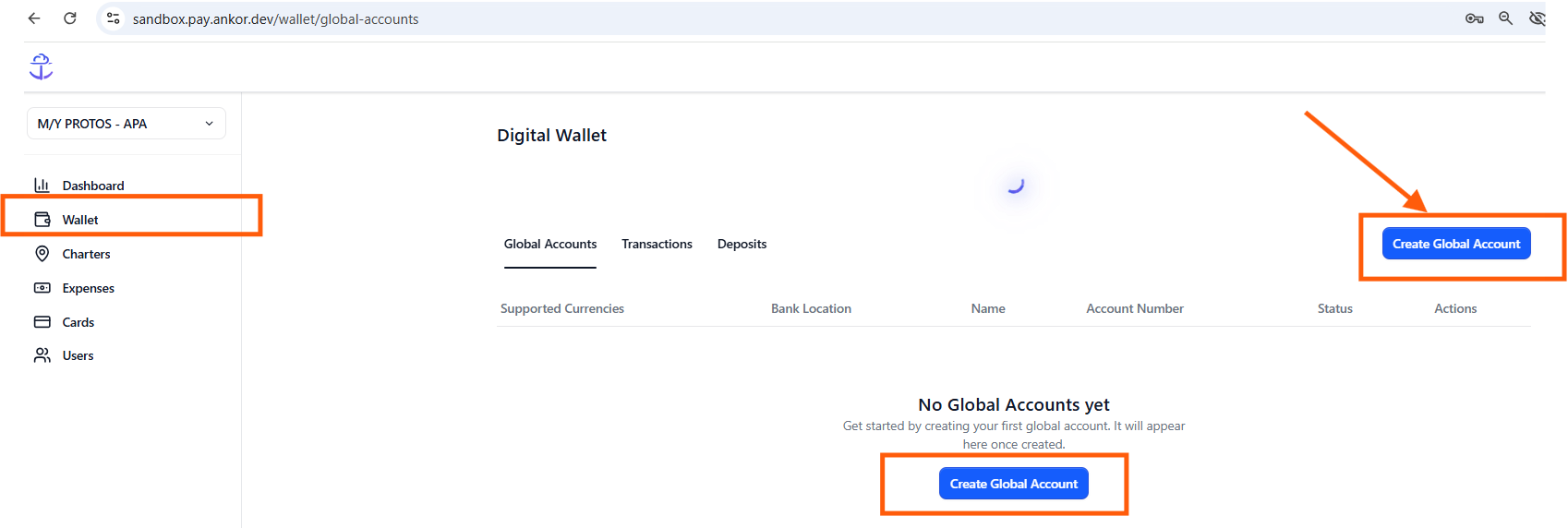
Step 1: Click on 'Wallet' from the chosen Vessel.
Step 2: Click on 'Create Global Account'
Step 3: Choose where you would like your Global Account to be located (US, UK, EUR-Netherlands, EUR-Denmark, AUD-Australia)
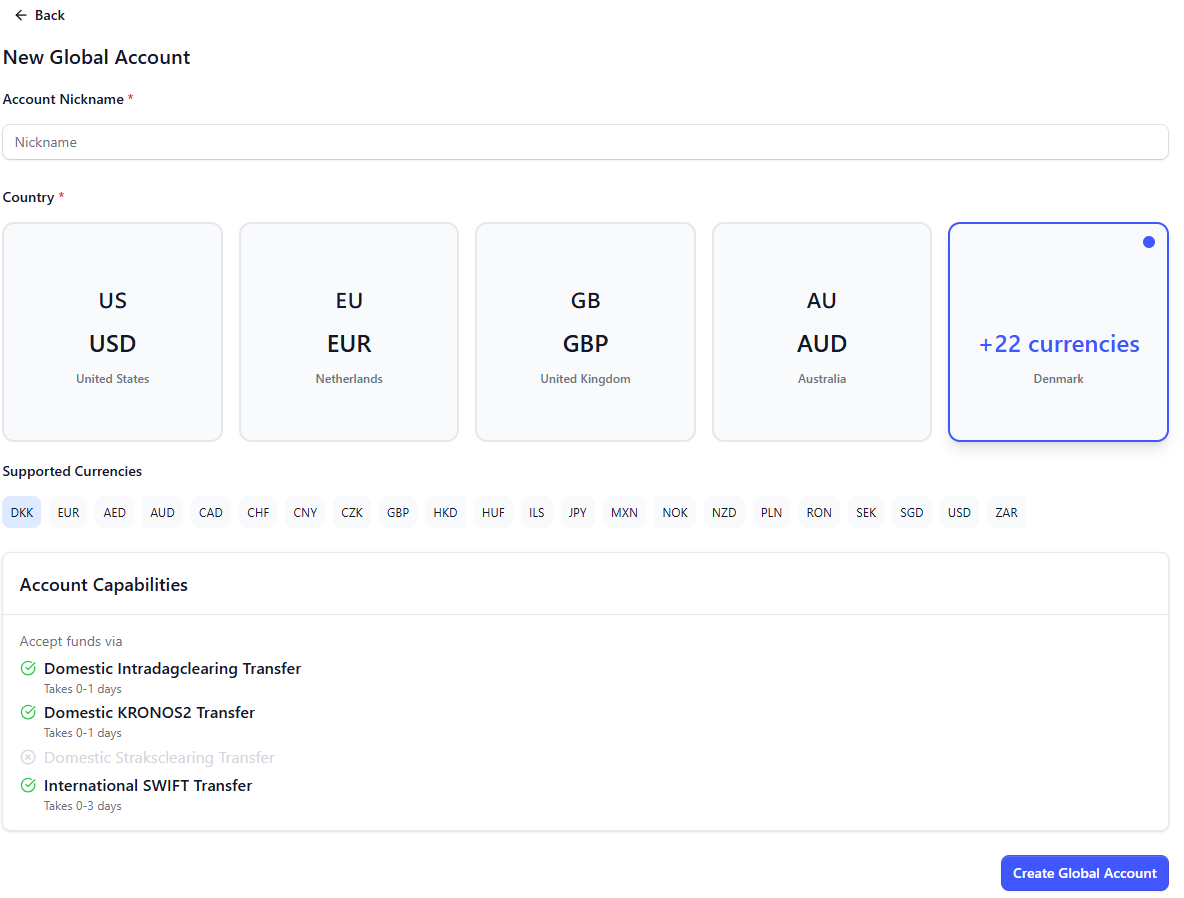
Now you are able to start moving funds (receiving and paying) in different currencies.
-> To see the list of supported currencies on Global Accounts, click here.
That's it! Now you are ready to start receiving funds, processing funds (expenses) and sending payouts externally.
->Click here to see how to Issue Cards.
Understanding my Wallet
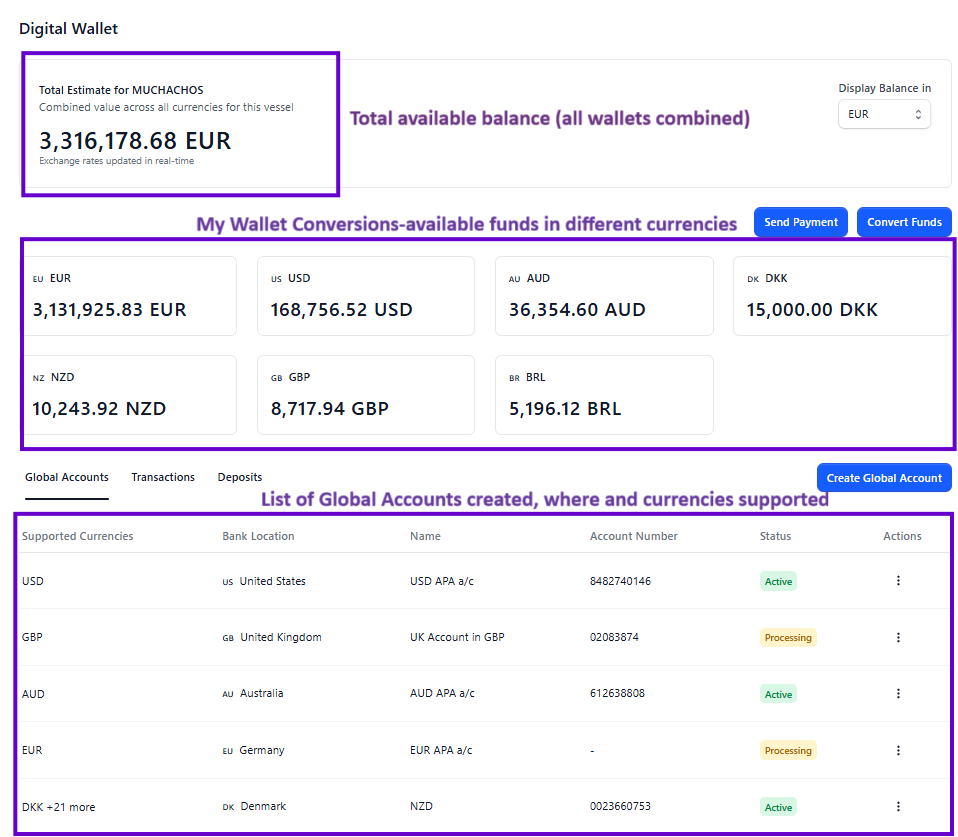
Financial Charges
AnkorPay does not charge fixed fees for loading/top-ups or for converting funds between currencies, except for the following specific cases:
Only 2 Applicable Charges:
- 1% FX margin
Applied to the foreign exchange rate when converting one currency to another. - $10 SWIFT transfer fee
Applied whenever a transfer involves moving funds between different currencies. This fee will be automatically deducted.
We do NOT charge |
No applicable fees on same currency transactions (cards usage & transfers) |
No deposit/top-up fee/load fee |
No onboarding/support fee |
No card annual fee |
Examples
Scenario 1: Converting money
Entity: Registered in the USA
Wallets: USD and EUR
- User converts USD to EUR
→ 1 percent FX margin applies. - User converts EUR back to USD
→ 1 percent FX margin applies.
Scenario 2: Paying in the same currency
- User pays a supplier in USD using money from their USD wallet
→ No fees. - User pays a supplier in EUR using money from their EUR wallet
→ No fees.
Scenario 3: International bank transfers
- User makes an international SWIFT transfer to Australia from their USD wallet
→ $10 SWIFT fee applies
→ If a conversion is needed (USD to AUD), 1 percent FX margin also applies. - User sends a SWIFT transfer in EUR to a bank account in the UK
→ $10 SWIFT fee applies
→ If conversion occurs (EUR to GBP), 1 percent FX margin applies.
Need help? Do not hesitate to get in touch with our team via support@ankor.io