
My physical card hasn’t been delivered yet
How long does it take for my physical card to be delivered?
Physical cards are usually delivered within 3-5 business days.
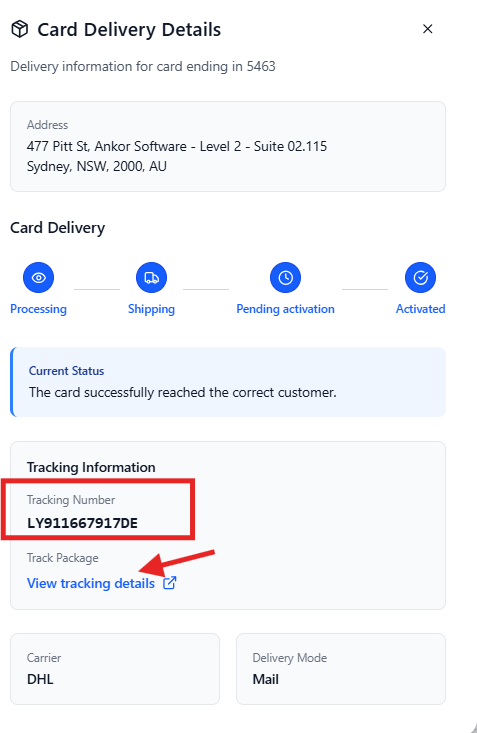
DHL delivers all Airwallex cards, which are printed in Germany. Every delivery includes a tracking number that can be accessed directly from AnkorPay.
Although most cards arrive quickly, international deliveries can occasionally experience delays due to customs processing in the destination country.
Please wait the full 2-5 business days before ordering a replacement card.
How can I check my card delivery status?
To track your delivery in AnkorPay:
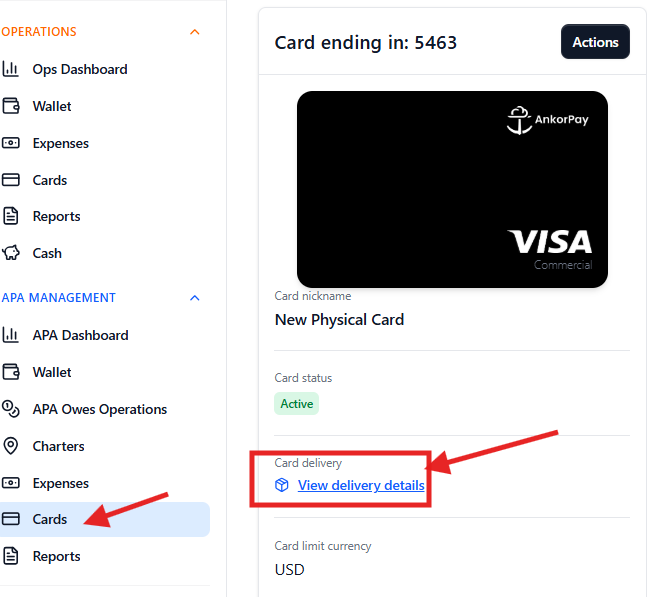
- Go to the Cards menu
- Select the physical card you issued
- Click the blue “View delivery status” link
This will display your DHL tracking number and latest delivery updates.
The tracking information can help you confirm whether the shipment is moving normally or if there may be a delay.
What if my card delivery is not moving?
In some rare cases, cards may be held at customs once they arrive in the destination country.
If your tracking status has not updated for several days and the parcel is already in your country, we recommend contacting DHL or your local delivery provider directly using the tracking number.
Customs may require additional consignee information before releasing the shipment, such as:
- ID or passport number
- Tax identification number
- Address confirmation
DHL will be able to confirm exactly what is required to release the delivery.
My card still hasn’t arrived after 2-5 business days
If your card has not been delivered after the expected timeframe, follow the steps below.
Step 1: Freeze your card
You or an Admin on your AnkorPay account can temporarily freeze the card.
If you need assistance, contact the AnkorPay Support team and we can freeze the card for you at support@ankor.io.
We recommend freezing the card first rather than cancelling it immediately, in case the card is delivered shortly afterwards.
Step 2: Order a replacement card
Only an Admin can order a new physical card.
Before reordering, make sure the postal address on the account is correct and up to date.
Once your replacement card arrives and is activated, your Admin can cancel the original missing card.
What should I do if my original card arrives after I’ve already ordered a replacement?
If the original frozen card is eventually delivered:
- Unfreeze the card
- Activate it
- Start using it normally
You should then cancel the replacement card that is still in transit.
Once the unused replacement card arrives, destroy it securely by cutting it into small pieces so the card number and name cannot be identified.
How should I dispose of cancelled cards?
To protect your information, always destroy cancelled cards securely.
We recommend cutting the card into several small pieces, ensuring the card number, chip, magnetic strip, and cardholder name cannot be identified before disposing of it.
Still have questions? Do not hesitate to reach out to support@ankor.io